
Inkjet Printer Resolution - DPI Printer Guide
Last Updated: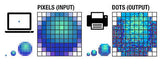 DPI vs PPI
There is widespread confusion between DPI (dots per inch) and PPI (pixels per inch), even though they describe two very different concepts. DPI refers to how printers place physical dots of ink or toner on paper, while PPI describes the resolution of a digital image displayed on a screen or stored in a file. Understanding the difference is essential for achieving the best print quality and avoiding common resolution mistakes.
Traditional printing methods reproduce images using tiny dots arranged in patterns. Dots per inch (DPI) measures how many of these printed dots a printer can place within one inch of paper. The spacing between dots determines light and dark areas, while color images are produced using four inks—Cyan, Magenta, Yellow, and Black (CMYK)—each applied in its own dot pattern.
DPI is one of the most commonly referenced—and misused—printing terms. It describes the output capability of a printer, not the quality of an image file. For example, a 600 dpi printer can place 600 dots horizontally and 600 dots vertically within a single inch. Some printers may vary between horizontal and vertical resolution, but the concept remains the same.
Although DPI and PPI are often used interchangeably, they are not the same. Pixels per inch (PPI) refers to the number of square pixels in a digital image. Pixels sit directly next to one another with no gaps. PPI describes display resolution and image detail, not how an image prints on paper.
A digital image has a fixed number of pixels—its width multiplied by its height. If you divide those pixel dimensions by 300, you determine the physical print size of the image at 300ppi. At that resolution, pixels are packed closely enough that individual pixels are not visible to the human eye at normal viewing distances.
When a digital image is prepared for printing, pixels are converted into dots. Because dots require spacing, multiple pixels are often represented by fewer dots. In practical terms, 300ppi in an image file often translates to roughly 150dpi on the printed page. This is why 150dpi (or 300ppi) has long been considered the standard for high-quality photographic printing.
How DPI Relates to Inkjet Printers
DPI does not directly equal PPI because printers frequently use multiple dots to reproduce a single pixel. Inkjet printers rely on a limited set of ink colors to simulate millions of tones, placing dots strategically to blend colors visually. As a result, higher printer DPI generally produces smoother gradients and finer detail—assuming the image has sufficient PPI.
In simple terms, DPI describes the resolution capability of the printer, while PPI describes the resolution of the image itself. A helpful way to remember this is: monitors display pixels, printers produce dots.
Modern photo-quality inkjet printers commonly advertise DPI values ranging from 1200 to 4800 dpi. These printers can produce acceptable photo prints from images with 140–200ppi resolution and high-quality photo prints from images with 200–300ppi resolution. Most inkjet printers include multiple quality modes:
- normal: 300 x 300 or 320 x 320 dpi
- high quality: 600 x 600, 720 x 720, or 1440 x 720 dpi
- photo quality: 1200 x 1200, 1440 x 1440, 2880 x 1440 dpi or higher
Many printers also offer draft or economy modes for text-only printing.
A common rule of thumb for inkjet printing is that image PPI should be between one-third and one-half of the printer’s DPI setting. For example, at a normal 300dpi setting, an image with 150ppi is usually sufficient. At higher print settings such as 720dpi, an image around 240ppi will typically deliver excellent results.
Summary: You rarely need image resolution higher than 240–300ppi for inkjet printing.
How PPI Relates to Digital Cameras
Digital cameras capture images with a fixed number of pixels, which determines the maximum print size at a given quality level. Entry-level cameras commonly capture images around 2048 x 1536 pixels, which equals approximately 3 megapixels.
The chart below illustrates how megapixels translate into maximum print size at different PPI levels. Most books and magazines require 300ppi for photo-quality reproduction. For example, a 3-megapixel camera can produce a 5" x 7" photo-quality print at 300ppi.
Megapixels vs. Maximum Print Size Chart
| Megapixels | Pixel Resolution* | Print Size @ 300ppi | Print size @ 200ppi | Print size @ 150ppi** |
| 3 | 2048 x 1536 | 6.82" x 5.12" | 10.24" x 7.68" | 13.65" x 10.24" |
| 4 | 2464 x 1632 | 8.21" x 5.44" | 12.32" x 8.16" | 16.42" x 10.88" |
| 6 | 3008 x 2000 | 10.02" x 6.67" | 15.04" x 10.00" | 20.05" x 13.34" |
| 8 | 3264 x 2448 | 10.88" x 8.16" | 16.32" x 12.24" | 21.76" x 16.32" |
| 10 | 3872 x 2592 | 12.91" x 8.64" | 19.36" x 12.96" | 25.81" x 17.28" |
| 12 | 4290 x 2800 | 14.30" x 9.34" | 21.45" x 14.00" | 28.60" x 18.67" |
| 16 | 4920 x 3264 | 16.40" x 10.88" | 24.60" x 16.32" | 32.80" x 21.76" |
| 35mm film, scanned | 5380 x 3620 | 17.93" x 12.06" | 26.90" x 18.10" | 35.87" x 24.13" |
*Typical Resolution. Actual pixel dimensions vary from camera to camera.
**At 150ppi, printed images will have visible pixels and appear less sharp.
Using this table, you can see the tradeoff between print size and image quality. With 2048 x 1536 pixels, you can produce a high-quality 5" x 7" print at 300ppi or a larger print with reduced sharpness. Producing true photo-quality 8" x 10" prints generally requires a camera with at least 6–8 megapixels.
Print size and quality are directly tied to pixel resolution. As print dimensions increase, the number of megapixels required grows rapidly. While manufacturers may claim large print sizes from low-megapixel cameras, true photo quality at sizes like 16" x 20" typically requires 24–30 megapixels.
Printing Resolution Primer
Beyond industry news, understanding the fundamentals of printer resolution helps users make better printing decisions. Printer resolution refers to how many dots a printer places within a given inch of paper, measured horizontally and vertically.
For laser printers, the most common resolutions are 600 x 600 dpi and 1200 x 1200 dpi. Higher resolutions are achieved by adjusting laser pulse size or paper feed speed. At 1200 x 1200 dpi, printed dots are extremely small—roughly one-fifth the width of a human hair—producing crisp text and detailed graphics.
In typical office environments, resolution beyond this level is rarely necessary. Most modern printers are designed with sufficient resolution for business documents, text, and standard graphics.
Still have questions about inkjet printer DPI? Contact us—we’re happy to help explain resolution, image quality, and printer settings.